We have compiled a list of manufacturers, distributors, product information, reference prices, and rankings for Workstation for.
ipros is IPROS GMS IPROS One of the largest technical database sites in Japan that collects information on.

Workstation for - List of Manufacturers, Suppliers, Companies and Products | IPROS GMS

Workstation for Product List

1~3 item / All 3 items

Displayed results

PC for the operation of the collision analysis support tool "HYCRASH" considering work hardening.

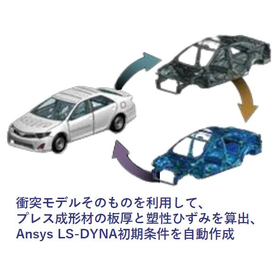
Automatic generation of initial conditions for Ansys LS-DYNA!! Quickly respond to vehicle design changes with "HYCRASH" operational PC.

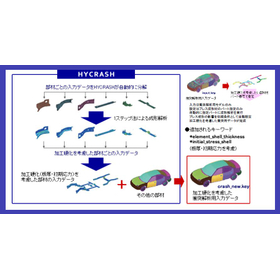
◆Automatic Generation of Initial Conditions for Ansys LS-DYNA: Rapid Response to Vehicle Design Changes In collision analysis, we aim for further accuracy improvements by considering the initial conditions of press-formed materials, such as sheet thickness and plastic strain. Since FEM meshes are created according to the respective purposes for press forming analysis and collision analysis, it is common to map the results of press forming simulations to the collision model due to differences in modeling of the R parts and mesh sizes. However, this method requires time for changing the analysis model or re-simulating when design changes occur, making rapid response difficult. HYCRASH solves this issue by automatically generating initial conditions for Ansys LS-DYNA using the collision model itself! ◆Automatic Generation of Collision Model Data: Improving Analysis Accuracy and Efficiency The only required input data is the collision analysis model. By simply specifying the part number of the press-formed material, HYCRASH conducts forming analysis for all those parts and fully automatically generates new collision model data. Since the collision model data includes initial conditions such as sheet thickness and plastic strain from the forming analysis results, it enables highly accurate collision analysis.

  • HYCRASH3.JPG
  • HYCRASH2.JPG
  • Structural Analysis
  • Mechanism Analysis
  • Analysis Services
  • Workstation for

Added to bookmarks

Bookmarks list

Bookmark has been removed

Bookmarks list

You can't add any more bookmarks

By registering as a member, you can increase the number of bookmarks you can save and organize them with labels.

Free membership registration

Machine for Reality Capture

Feel free to consult us about the best machines for photogrammetry software such as RealityCapture and Metashape!

This is a proposal case for customers conducting Structure from Motion (SfM) on archaeological remains and artifacts using the photogrammetry software "RealityCapture" to create 3D models from photographs. When comparing RealityCapture with Metashape, RealityCapture requires less memory due to its algorithms, but it has more frequent access to storage, making storage speed crucial. Therefore, we prioritize storage speed over the maximum memory capacity and use the latest generation CPU to achieve an overall speed improvement in the specifications.

  • Modeler
  • Workstation for

Added to bookmarks

Bookmarks list

Bookmark has been removed

Bookmarks list

You can't add any more bookmarks

By registering as a member, you can increase the number of bookmarks you can save and organize them with labels.

Free membership registration

Workstation for the microscope image analysis software "IMARIS"

Workstation suitable for the use of the microscope image analysis software "IMARIS".

IMARIS is an image analysis software widely used in the fields of biology and medical research. It enables the visualization, analysis, and interpretation of 3D and 4D images obtained from microscopes. It is designed to handle data sets of several terabytes, primarily from light sheet microscopy images. The workstation provided by Tegxis for the microscope image analysis software "IMARIS" is certified by Oxford Instruments. In collaboration with Oxford Instruments, we investigated the optimal PC specifications for using IMARIS and confirmed the configuration's functionality. With reliable processing power and quality for IMARIS usage, we support your research and development. Additionally, we can provide the workstation with IMARIS pre-installed, ensuring that it is ready for use immediately upon arrival, with the environment set up accordingly. Furthermore, since we conduct on-site installation work, you can begin analysis immediately after preparation without any hassle during the introduction of new licenses or after product updates.

  • Desktop PC
  • Workstation for

Added to bookmarks

Bookmarks list

Bookmark has been removed

Bookmarks list

You can't add any more bookmarks

By registering as a member, you can increase the number of bookmarks you can save and organize them with labels.

Free membership registration